Liability Waiver
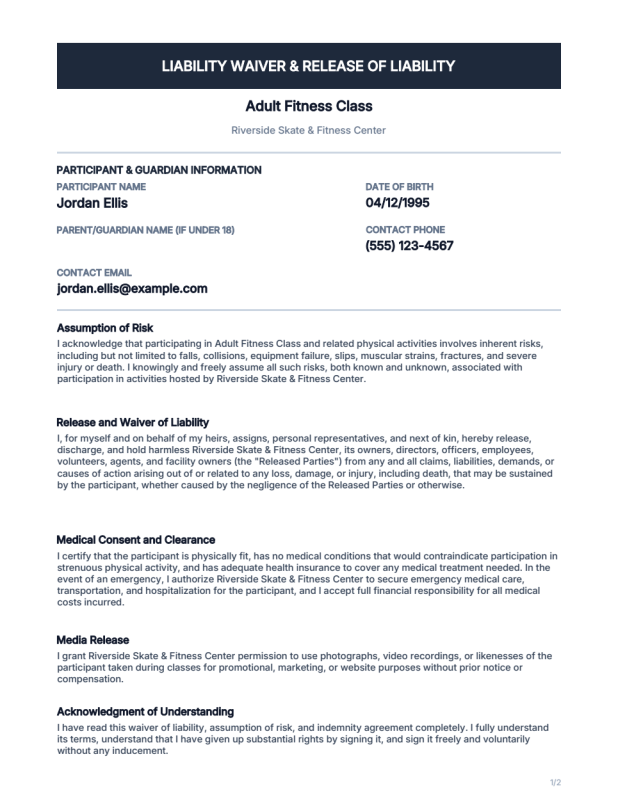
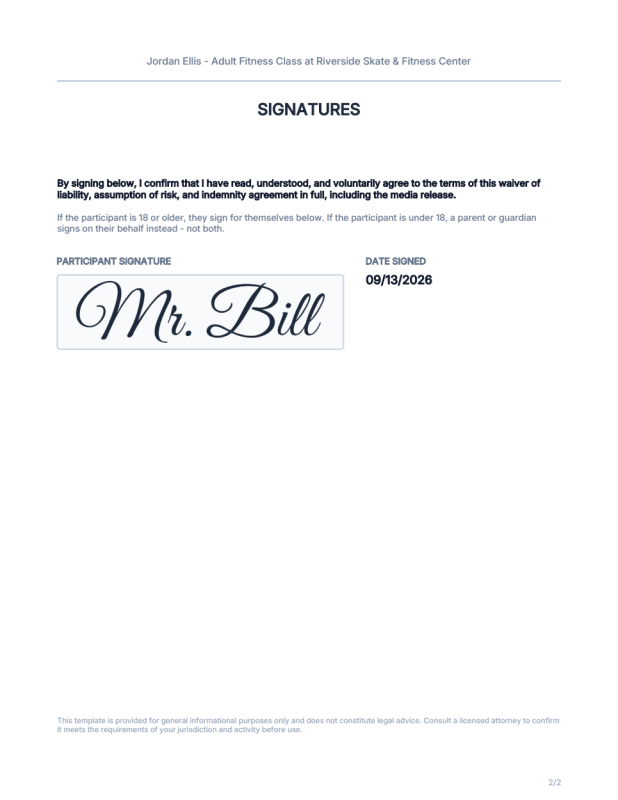
A general-purpose liability waiver and release for a class, lesson, or activity - participant/guardian info, five plain-English legal sections (risk, release, medical consent, media release, acknowledgment), and a signature - either the participant's own,
1 / 2
Liability Waiver
A two-page liability waiver and release of liability for a gym class, skate lesson, or any similar activity where a participant needs to sign in before taking part.
What's included
- Page 1 - facility/activity name, participant and parent/guardian info (name, date of birth, contact phone/email), and five legal sections: Assumption of Risk, Release and Waiver of Liability, Medical Consent and Clearance, Media Release, and Acknowledgment of Understanding
- Page 2 - the acknowledgment checkbox's recap and the signature itself
- The same five legal sections are also shown right in the form, above the acknowledgment checkbox - so the signer can actually read what they're agreeing to before they sign, not just on the PDF afterward
- Exactly one signature, never both: the participant's own if they're 18 or older, or a parent/guardian's - on the participant's behalf, since a minor can't legally consent themselves - if they're under 18. The inapplicable section is both hidden on the generated document and not required to submit.
minor_participantpreset to preview the guardian branch without re-filling the form
Examples for Authors
- Splitting a document across pages once it outgrows one - this started as a one-page waiver with a single short paragraph; once the real legal text grew to five separate sections plus a participant/guardian info block, it no longer fit one page at a readable size.
process.jscallsaddPage()twice thenoverlay("page1.json", 1)/overlay("page2.json", 2)- the same two-page pattern as the Membership Card project's front/back, just applied to a single continuous document instead of two physically distinct sides. - A value computed once in
validate.js, reused as a blockcondition-is_minoris derived fromparticipant_dobinvalidate.js(so it can actually be validated before the document is ever generated), thenprocess.jsoverlays the exact sameinputs.is_minorthatvalidate.jsalready computed, and both signature sections (on page 2) gate on it with a plaincondition-is_minor != truefor the participant's own,is_minor == truefor the guardian's. No duplicated age math between the two scripts. - An either/or requirement, not two independent ones - neither signature field carries
form.json's ownrequiredrule (that would make it unconditionally mandatory and block whichever branch doesn't apply);validate.jsrequires the participant's signature only when NOT a minor, and the guardian's name/signature only when a minor is. Since the two branches are mutually exclusive, their overlay blocks are also given the exact same coordinates - only one ever renders, so there's no dead space left by the other. - A required checkbox that isn't
form.json's ownrequiredrule - a checkbox'srequired: trueonly fires on a missing value, not onfalse(an unchecked box is a perfectly validfalse, not empty) - sowaiver_acknowledgedis enforced explicitly invalidate.jsinstead, the same pattern the W-9 demo project uses for its classification checkboxes. label-type fields for on-screen document review - each legal section is a heading+body pair of plainlabelfields (never part of submittedinputs), placed before the acknowledgment checkbox so the signer sees the waiver's actual language in the form, not just on the generated PDF afterward. Alabel's own text is always static - it never runs through{inputs...}substitution the way a layout block's text does - so the on-screen copy is worded generically ("this activity"/"this facility") rather than referencing the liveactivity_name/facility_namevalues the waypage1.json's own blocks do; if you edit the release language, update both copies.- Reformatting a date field for display -
participant_dobis passed throughformatDate()beforeoverlay()reads it, same fix used throughout this library (see Event Badge).
Customizing
Swap the accent color, recolor the header band, or add fields (an emergency contact, an additional clause) as your activity requires.
Not legal advice. This is a generic template, not a substitute for legal review - have a licensed attorney confirm it meets your jurisdiction's and activity's requirements before relying on it.